How to "Log Service" for your vehicle!
Logging a service for your vehicle is super easy!
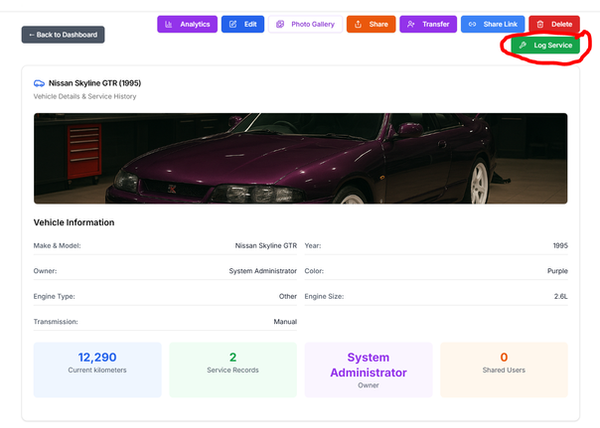
To get started, you just need to click on the image of the vehicle you want to service.

Now that you are in your vehicle profile, you will see the button to "Log Service" on the right hand side.
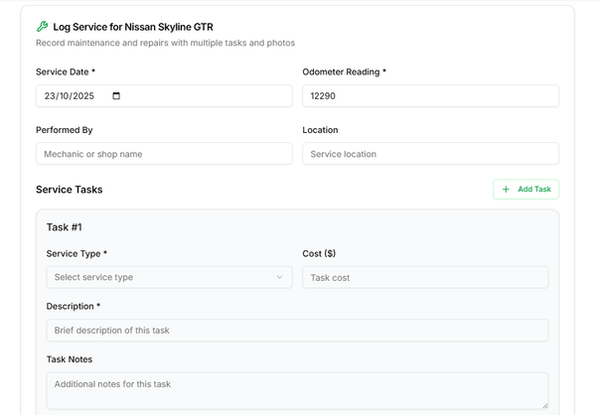
You should now be on the Log Service page.
From here you can enter details for your service such as how many KM's your vehcile has done, who serviced it and where.
The task has a number of drop-down options that you can select based on what you are doing eg. Oil filter, Oil Change, General Maintenance and more!
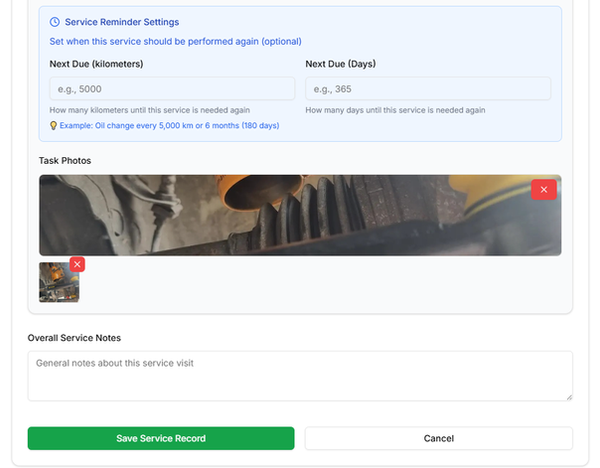
You can then set a service reminder as well as add photos of the work you have completed or any receipts you have.
Once you set a service reminder you wont see it on your dashboard until you are within 30 days or 1000kms of the value you set.
You can add photos by clicking inside the Task Photo box and inserting the image you want. If you click the red cross in the top right of the big image, you will be able to add multiple images to your job.